
For QSR chains
How Graivy fits into your restaurants
Where each product works in a store, what it connects to, who does what on every order, how a chain moves from pilot to every store, and the numbers a pilot produced.
What a pilot showed
Measured during peak rush periods, in a pilot of ServThru with a leading national QSR brand. Each drawing below shows where a result like this comes from.
- 23%faster service times
- 95%order accuracy
The brand’s name is withheld under NDA. Ask us how service time and accuracy were measured, and what a pilot in your stores would track.
Where the gains come from in a store
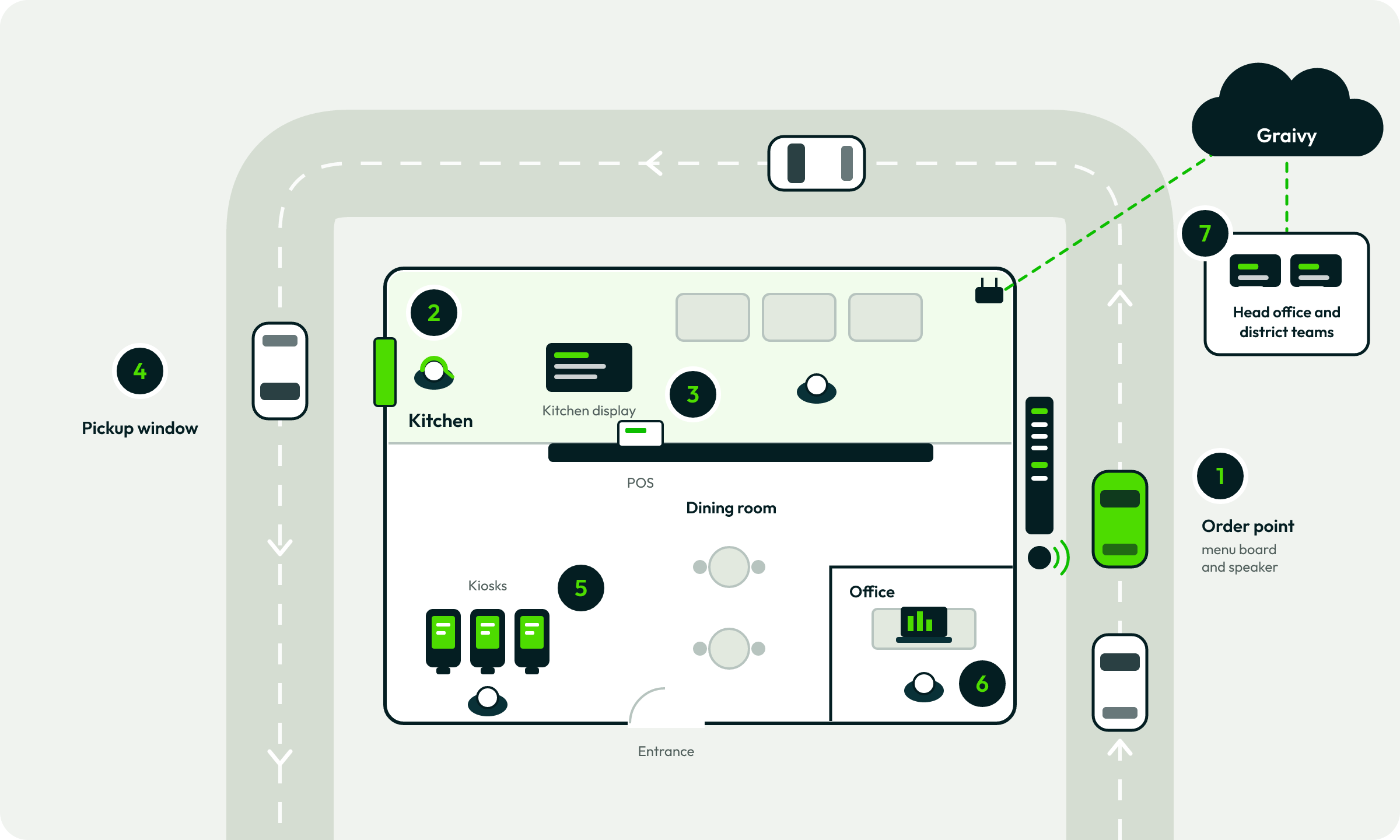
Three products, one restaurant, nothing new to build. The numbered places are where service gets faster, upsells get consistent, and performance gets measured.
- 1Order point: faster, more accurate orders. ServThru greets the guest and takes the order by voice; in a pilot with a leading national QSR brand, service times were 23% faster and accuracy reached 95% at peak. Drive-Thru Analyzer listens here too.
- 2Crew headset: alerts, not listening. Your team doesn’t listen to every order. When human judgment is needed, ServThru alerts them and they step in.
- 3POS and kitchen: a head start. Confirmed orders from ServThru and KioskOS land straight in your POS, so the kitchen starts right away.
- 4Pickup window: the personal part stays personal. Your team takes payment and hands off the meal.
- 5Kiosks: more add-ons, fewer assists. KioskOS surfaces the single best add-on at the moment it’s most likely to convert, and pilots measure completion time, assists, and add-on rate.
- 6Office: coaching from proof. Managers coach from real conversation examples in Drive-Thru Analyzer, with highlights and annotations.
- 7Head office: compare and control. Compare stores, shifts, and dayparts in Drive-Thru Analyzer; manage kiosk menus and promotions centrally in KioskOS, with local overrides.
Download this drawing (PNG): Where the gains come from in a store
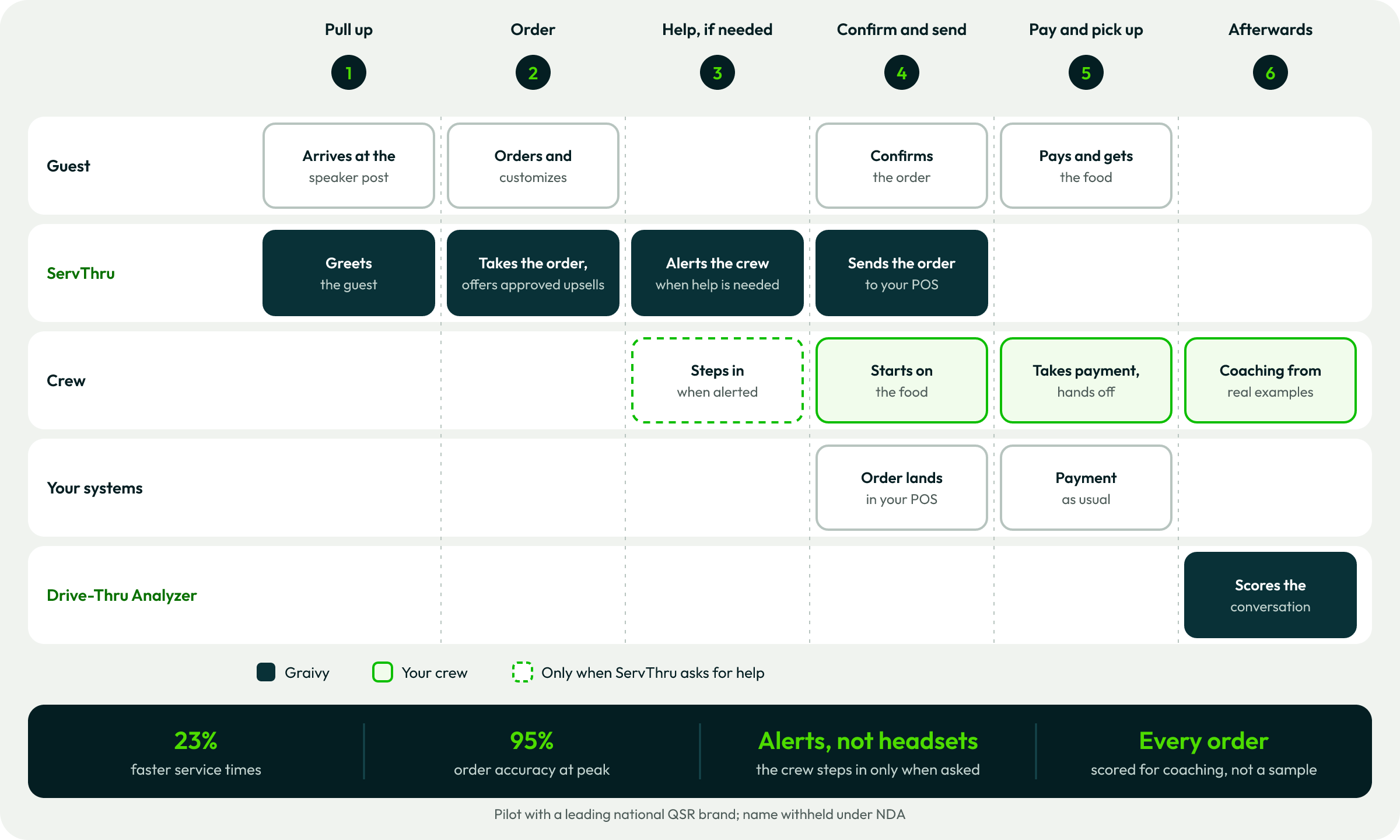
Who does what on one order, and what you get
ServThru takes the order and your crew stays in control: when human judgment is needed, the crew gets an alert and steps in. Afterwards, Drive-Thru Analyzer scores the conversation, so managers coach from real examples. The strip at the bottom is what changes.
Download this drawing (PNG): Who does what on one order, and what you get
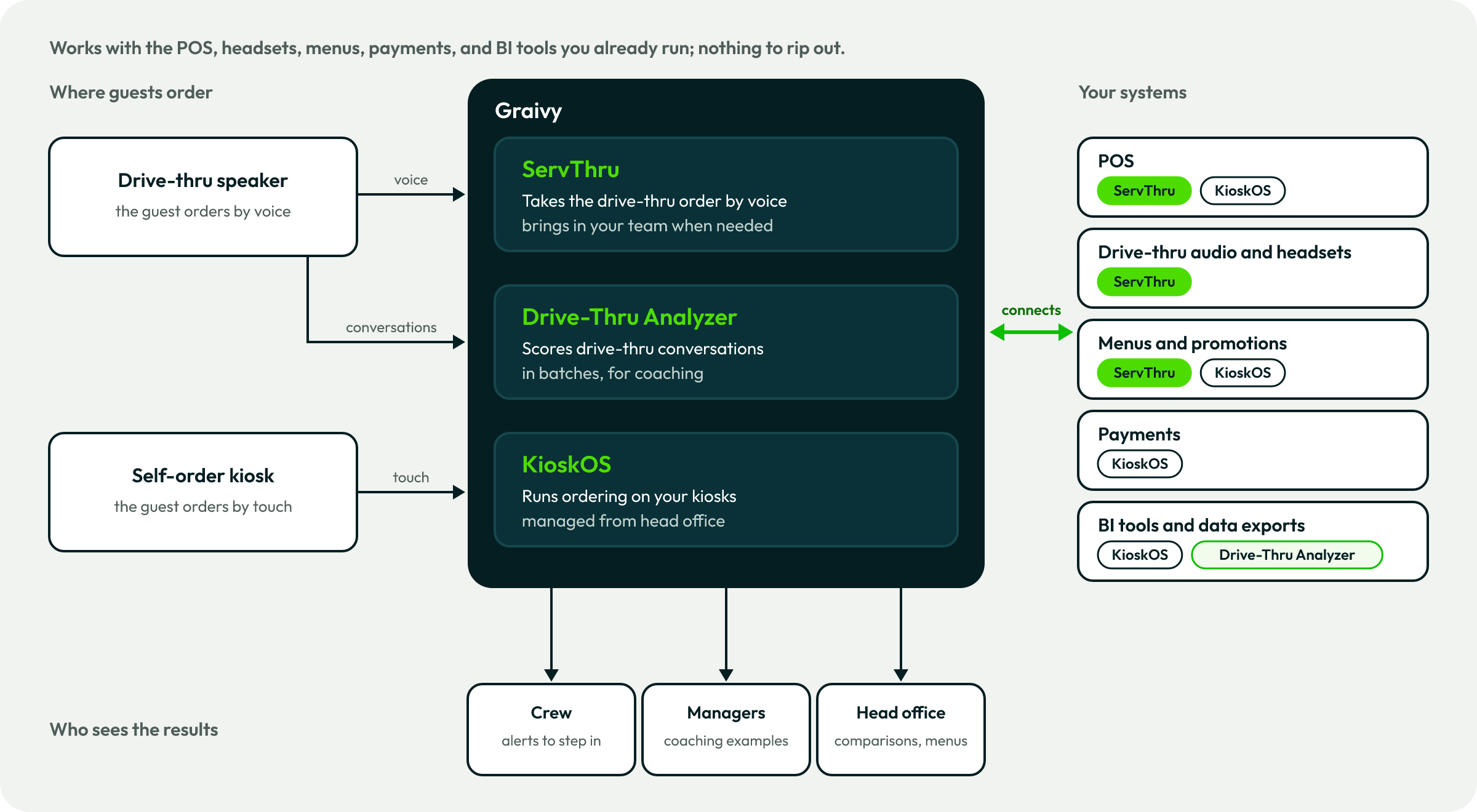
Works with what you already run
Graivy connects to the POS, headsets, menus, payments, and BI tools your restaurants already use; nothing to rip out. Which connections a pilot needs depends on your POS and hardware.
Ask us which POS systems and drive-thru hardware we support today, and how the connection would work for yours.
Download this drawing (PNG): Works with what you already run
What each team gets
A rollout touches every part of a chain. Here’s what changes for each team, and what to ask us.
Operations
COO, VP of operations, district managers
ServThru takes drive-thru orders by voice and brings in your team when human judgment is needed. Drive-Thru Analyzer shows missed upsells, service breakdowns, and coaching moments by store, shift, and daypart.
Ask us about How accuracy and hand-offs are measured in a pilot.
Franchisees and store managers
The people who run each store
Crews don’t have to listen to every order; they get a clear alert when help is needed. Managers coach from real conversation examples, with evidence.
Ask us about Crew training, and how the busiest hours of the day are handled.
IT
CIO, CTO, IT and security teams
ServThru works with your existing POS and drive-thru hardware. KioskOS connects to POS and payment systems through connectors or APIs, and rolls out changes in stages, with one-click undo.
Ask us about Which POS systems, headsets, and kiosk devices are supported today, and your security review.
Finance
CFO and finance teams
Approved upsell offers are made consistently, whoever is working and however busy the shift. KioskOS supports A/B tests, so your analysts can check lift in your own BI tools.
Ask us about Pricing, and a pilot business case built on your own numbers.
Marketing and brand
CMO, brand and menu teams
ServThru stays in sync with promotions, seasonal updates, and limited-time offers. KioskOS screens are fully brandable, with global templates and local overrides for promos, prices, and language.
Ask us about How promotions reach the drive-thru and the kiosks, and how the screens carry your brand.
Legal and privacy
General counsel, privacy and compliance
Voice ordering processes what guests say, and Drive-Thru Analyzer works from drive-thru conversations and their transcripts.
Ask us about What is stored, where, for how long, and how guests are told.
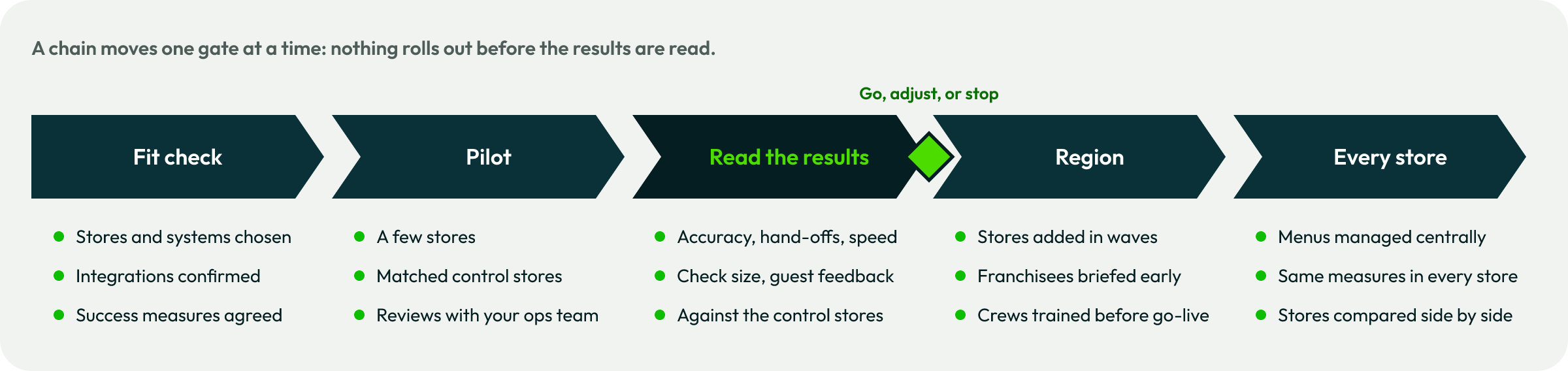
From pilot to every store, one gate at a time
A path we suggest: prove it in a few stores, read the results against matched control stores, then roll out region by region. Nothing moves past a gate until the results are read.
Download this drawing (PNG): From pilot to every store, one gate at a time

Plan a pilot
A short, results-focused demo that shows the operational impact, how integration works, and a clear path to a quick pilot.
Request a demo